How To: Give Discount on Order if Order Subtotal Exceeds Certain Value
СS-Cart allows you to make a promotion that applies only when the combined price of all products in the order is higher than a certain value. To create this promotion, follow the steps below:
In the Administration panel, go to Marketing → Promotions.
Click the + button in the top right corner and choose Add cart promotion.
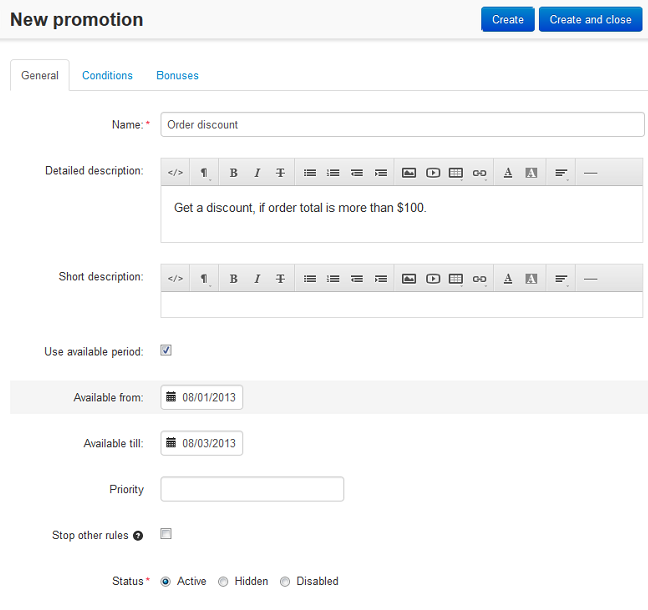
Fill in the fields on the General tab. Make sure your promotion has a Name, and that the Status is set to Active.
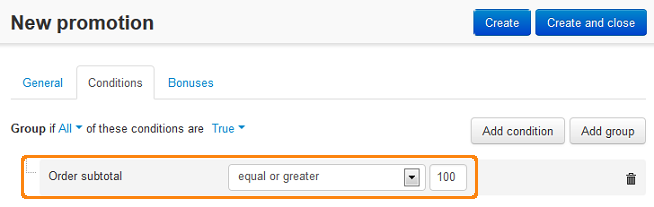
Switch to the Conditions tab and click the Add condition button.
Select Order subtotal from the dropdown list. Then choose equal or greater and enter the desired subtotal value in the primary currency of your store.
Note
By subtotal we mean the combined price of all products that are currently in the cart.
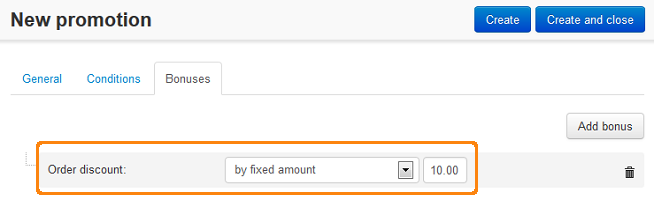
Switch to the Bonuses tab and click the Add bonus button.
Choose any bonus from the dropdown list, and configure that bonus. For example, let’s choose Order discount with by fixed amount, then set the value to 10. That way a customer will get a discount on order subtotal. The size of the discount will be 10 units in the primary currency of your store.
Click the Create button.
Questions & Feedback
Have any questions that weren't answered here? Need help with solving a problem in your online store? Want to report a bug in our software? Find out how to contact us.